less software, more sawdust.
kerf turns your drawing into a cut your router can make: svg or dxf in, g-code out, in the browser.
svg · dxf in
grbl · mach3 out
3-axis routers
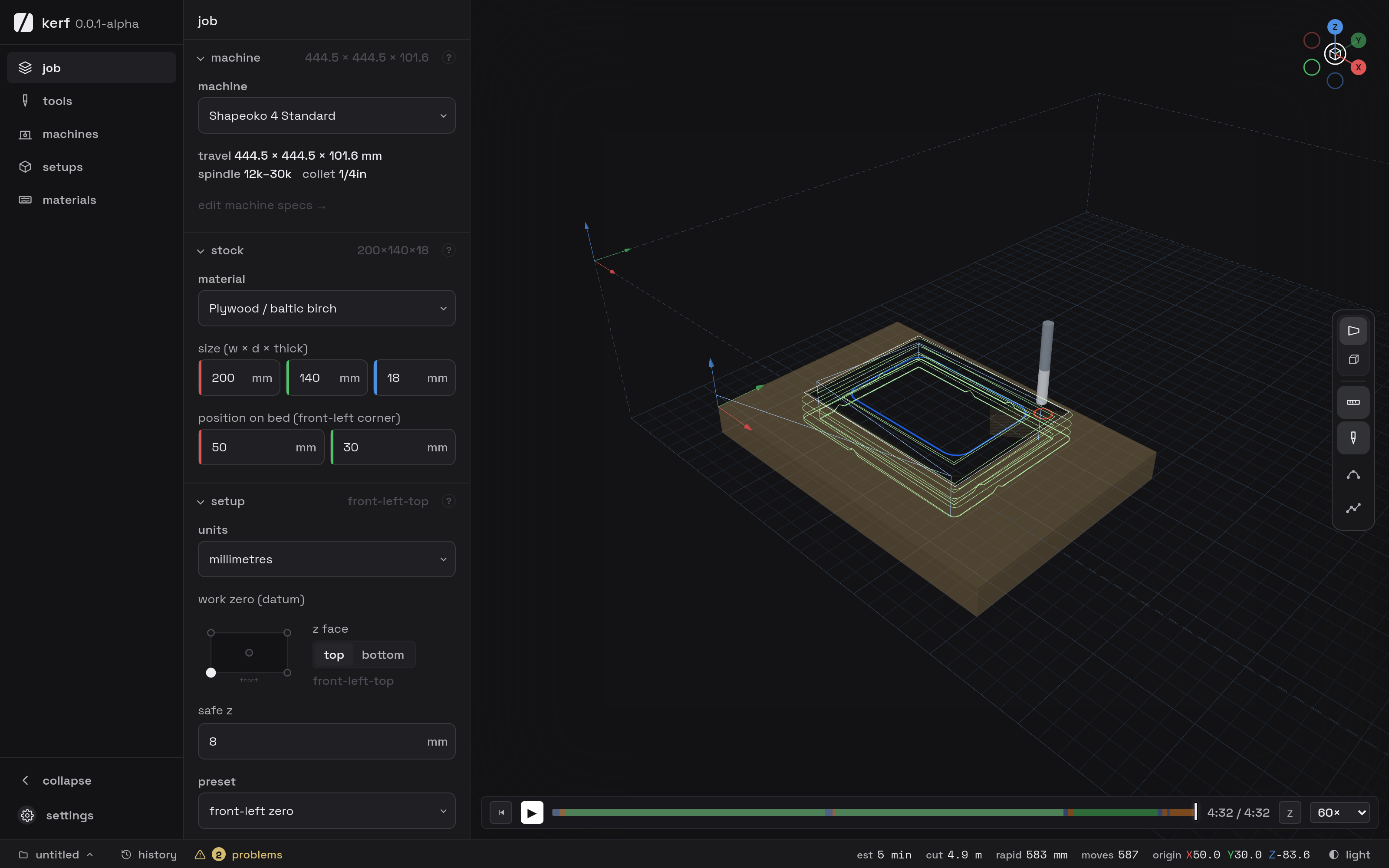
kerf turns your drawing into a cut your router can make: svg or dxf in, g-code out, in the browser.
svg or dxf, from whatever you already draw in. layers come along.
pick the operation and the bit. kerf checks depths and feeds against your machine and says so when they don't fit.
g-code for grbl or mach3, previewed before it leaves. what you saw is what it runs.
if you cut for yourself, for friends, or for the small runs you sell, you should not have to buy a seat built for a factory floor. kerf is sized for your bench, and it costs nothing.
if it takes grbl or mach3 g-code, yes. you describe the machine once, bed, rapids and collet, and every cut is checked against it before the file leaves.
yes. there is no desktop version today and nothing to download. it runs in a browser tab, which while it is alpha means one build to fix instead of several. a bundle you can keep on your own disk is planned for when kerf leaves alpha, and i am not putting a date on that.
svg and dxf. the layers and colours you drew with come along and become how each operation picks what it cuts, so whatever you already draw in keeps working.
profile, pocket, drill and v-carve, for 3-axis routers. profile carries holding tabs, ramped entries and dogbone corners; pocket clears around islands. no stl, no 4th axis.
you need to know your machine and your bits. the rest is explained where you use it: every section has a help ring that tells you what a field does, with your own numbers in the sentence.
nothing today, and it asks for no card. paid plans may come later. kerf is built for hobbyists and makers, and that is the measure any plan has to pass.
yes, of course. is anyone still writing software without ai in 2026? but this is not a dark factory. every output is read, questioned and reworked by a human before it goes anywhere near your machine, because slop compiles fine and then falls apart the first time it has to change.
nothing i can honestly promise, and nobody can. big companies cannot either, and google keeps a graveyard to prove it. what i can tell you is that nothing here holds you hostage: your drawings stay svg and dxf, your projects are open text, your toolpaths are plain g-code on your own disk. if you leave tomorrow you leave with all of it and open it elsewhere. while it is here, you get answers from the person building it.
hobbyists and makers, and the aim is that the part coming off the machine does not give that away. three axis routers, 2.5d and v-carve: signs, inlays, joinery, parts cut to size. no 5 axis, no lathe, no machining from a 3d model. if you spend your day in vcarve, fusion or mastercam, you are probably better off staying there.
more questions? the knowledge base is being written alongside the app.
built in the open, with the people cutting with it. if something breaks or something's missing, say so.